
Ditch the Paperwork. Focus on the Work.
Running a small trade or service business is admin-heavy and stressful. OfficeTidy saves hours of paperwork, keeps jobs and money organised, and cuts stress so you can focus on the actual work.
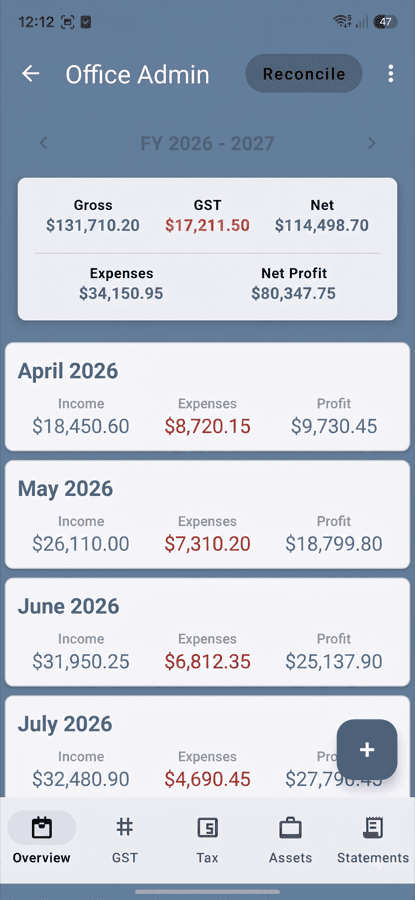
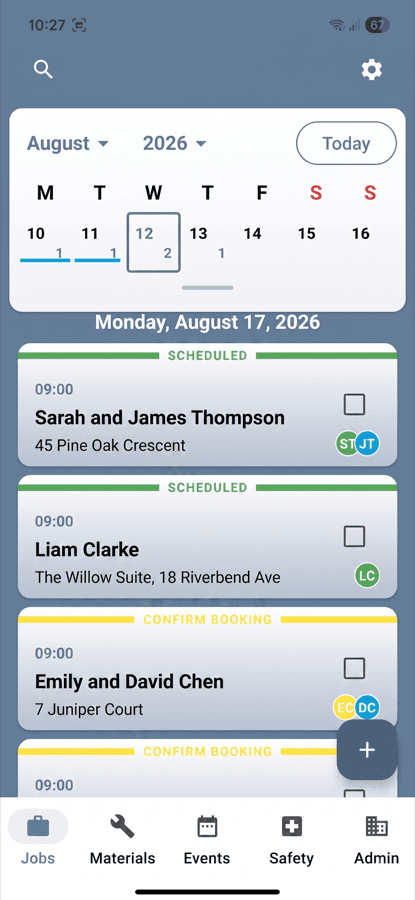
Save Time, Money & Stress
Finally, an app that's simple enough to use on the job site, yet powerful enough to run your entire operation
Ultra-Fast Setup
Open the app, create your first job card, and start using it immediately. No complex computer setup required.
Small Business Pricing
Designed for small businesses - one-man bands to small teams can afford professional business management.
Freedom from the Office
Do everything on your phone - quotes, invoices, scheduling, and admin work. No need to go back to the office.
See the App in Action
Built for speed on the job site — clean, simple, mobile‑first.
No credit card needed.
How it works
Simple 4‑Step Process
From first call to paid invoice — all in one tidy flow.
Get Call
Customer rings
Create Job
Tap +, add details
Do Work
Navigate, quote, complete
Get Paid
Send invoice, done
Testimonials
What NZ business owners are saying
"Enjoying the app. On similar job management apps I had to use the desktop version to do the same thing I can do from my cell phone now. I am a contractor and have been doing all of my job management and scheduling from this app. Has a good H&S system built into the job cards."
"Great customisable app with user friendly interface. Ideal for small to medium business use, keep track of bookings, job cards, expenses, banking, invoicing etc. You can keep it simple or use all the bells and whistles."
"Excellent app for small businesses wanting to keep track of income and expenses. A couple of stand-out features are the booking of jobs and the health and safety cards. Highly recommended, it is obvious that a lot of time and thought has gone into this app."
"Makes life as a self-employed contractor so simple and easy. I love the feature where I can click on the job card, find the address, and it pops up on Google Maps."
"Really great app so far. Everything automates, easy invoicing etc, and simple layout. I keep finding tools it does more simply than my old written bookwork system."
"Easy to use, everything needed to run a small business, great!"
Everything You Need
Simple where it matters, powerful when you need it.
Quick Job Cards
Create jobs in seconds on your phone
On‑Site Quotes
Send professional quotes on the spot
Team Management
Add staff with permissions
Smart Scheduling
Recurring and multi‑day jobs
Professional Invoices
Get paid faster
Expense Tracking
Snap receipts; GST auto‑handled
Straightforward Pricing
Choose Your Plan
Built for small trades and service teams. Prices in NZD, billed monthly. Cancel anytime.
Free Trial — 30 days, Full Feature Access
Everything included — jobs, quotes, scheduling, invoices, expenses. Try it on real jobs. If you're not saving time, money, and stress — cancel anytime. Keep your data — export anytime.
Start Free TrialAll plans include job cards & scheduling, quotes & invoices, photo receipts & GST, data export & backups. Prices shown are monthly in NZD. Cancel anytime.
Powerful Business Tools
NZ‑ready features that save hours every week.
Bank integration (Akahu for NZ)
Connect feeds to speed up reconciling jobs and expenses.
Receipt photos
Snap and attach receipts to jobs or expenses in seconds.
Team permissions
Roles for Admins, Contractors, and Employees.
Automatic backups
Your data is backed up automatically for peace of mind.
GST calculations
NZ‑ready GST on quotes, invoices, and reports.
Asset tracking
Keep tabs on tools, equipment, and job materials.
Health & safety forms
JHAs, incidents, and site notes in one tidy place.
Data export
Export your records anytime—your data stays yours.
Xero sync
Two-way sync with per-job profit tracking in Xero's own reports.
IRD filing
File GST and Income Tax straight to Inland Revenue (in certification).
30 days free. Cancel anytime.
Your Evenings Back. Starting Today.
Try OfficeTidy free for 30 days. If it doesn't save you 10+ hours per week, just delete it.
Frequently Asked Questions
Still have questions? Contact us. For the full list, see the extended FAQ.